Background
I’ve never had a powerful computer. My first systems were your standard, consumer-grade laptops that you buy at a department store. In middle school, I bought a used Dell Optiplex 380 on Kijiji. Once I got to high school, I loaded it up with Linux, and from about grade 10 onwards all of my computers have been used Lenovo ThinkPads and ThinkCentres1. All of these systems were great, and despite their modest specs, they were plenty powerful for schoolwork, programming, and light gaming.
That being said, I’ve always wanted to be able to run AAA titles. My systems’ limitations meant that I couldn’t really run anything made in the past decade, with exceptions for less demanding titles like Minecraft and Terraria, and highly-optimized ones like Factorio. I also spent a lot of time playing older games like Old School RuneScape, Team Fortress 2, Garry’s Mod, and POSTAL 2. All of these games are fantastic, and I have lots of great memories playing them, but the desire to run more recent titles like Elden Ring, Cyberpunk 2077, and GTA V2 stayed with me.
I’d wanted to build a PC for ages, and I specifically wanted one with a Radeon3 graphics card, but couldn’t ever justify the cost of purchasing the parts. Despite now being arguably one of the worst times in history to want to build a computer, I finally decided a few weeks ago that I would pull the trigger and build my first PC. And so, I’ve graduated from used ThinkPads and ThinkCentres to Draynor.
The Build
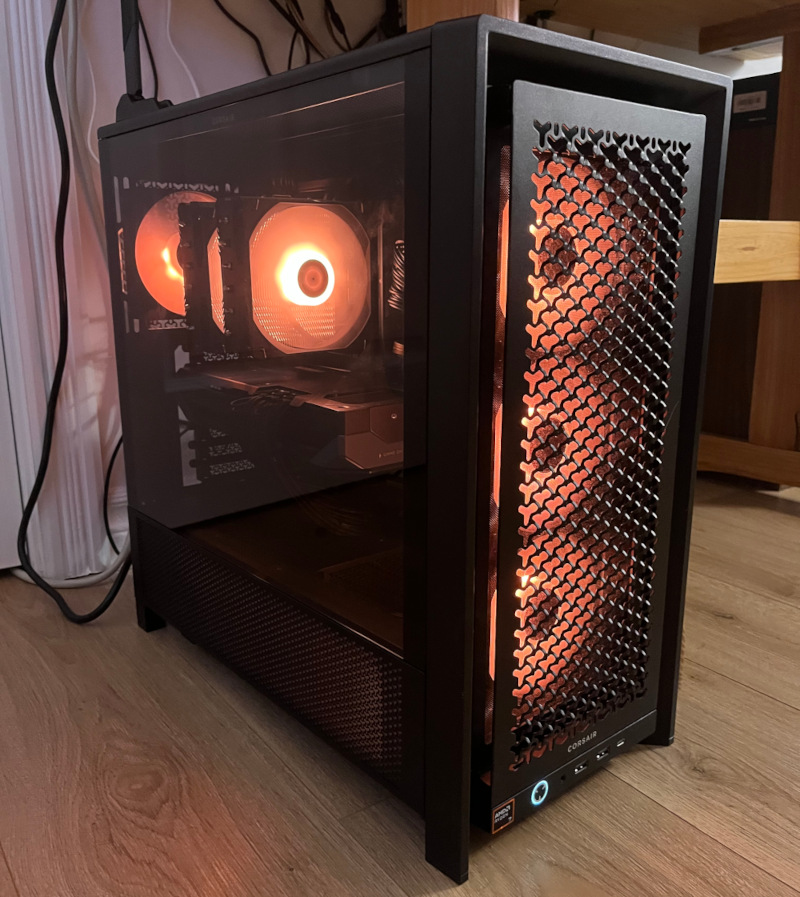
Draynor in all its glory
I may have gone slightly overboard with the specs, especially given the games I play. My hope is that this will make my system relatively futureproof4. The main specs are:
- CPU: AMD Ryzen 7 9800X3D @ 4.7 GHz
- GPU: AMD Radeon RX 9070 XT (16GB GDDR6)
- RAM: 32GB DDR5
The whole parts list is available on PCPartPicker. The build went quite well, but I have to say I’m not a fan of Asus’s lever-style “Q-Release” PCIe slots! I can’t complain, though, as it powered up and posted on the first try. I suppose that’s the payoff of watching PC building videos for 10+ years!
Setup Shenanigans
The only complications I ran into were, funnily enough, at the software/firmware level. The first was shortly after I finished the build: I had my Linux boot image on a USB flash drive, and threw it into a random USB 3.0 port on the motherboard. As soon as I plugged it in, the entire BIOS became unstable and was barely usable. I panicked, but eventually found out that it didn’t happen if I plugged the boot disk into the motherboard’s single USB 2.0 port. This issue hasn’t resurfaced since I ran the install, regardless of what USB port the boot disk is plugged into. Not sure what that’s about!
I ended up installing Linux Mint Cinnamon and Windows 11 Pro. The decision to install Windows was to cover situations where certain applications do not natively support Linux and refuse to run in Wine/Proton. This mainly applies to online games with kernel-level anticheat, and the online testing software used for certain certification exams. The Linux install was as straightforward as ever. I’d never actually installed Windows before, but that process was also straightforward, except for the somewhat annoying workarounds required to set up a local account and to debloat the OS post-install.
I’ll also say that RGB control is, across the board, a mess. I’ve used OpenRazer on Linux forever, with no issues at all. But now I had to introduce my Asus motherboard and the Gigabyte Radeon into the mix, and the only way to feasibly do this is with OpenRGB. While I have nothing but respect for the OpenRGB developers for coming up with the only usable cross-vendor RGB solution on Linux, it was a bit jarring coming from OpenRazer, which is significantly more refined. But, I will say that OpenRGB does laps around the Windows-only SignalRGB in terms of usability, functionality, bloatedness, and licensing model.
I initially thought these RGB headaches could be put to an end by turning off my GPU’s RGB and using a Razer ARGB controller for my fans to bypass the motherboard (and thus be usable with OpenRazer), but it turns out that this part is long discontinued and very hard to find. After checking eBay every day for about a week, I ended up snagging one, so we’ll see how that works once it comes in!
For fan control, I installed CoolerControl on Linux and FanControl on Windows. CoolerControl is a fantastic piece of software for both controlling fans and monitoring temperatures over time. FanControl is fine for setting fan curves, but I’ve yet to find a monitoring solution that’s as good for Windows.
Results
This is the fun part. I didn’t come into this with any graphically-demanding games, so I took what I had and cranked the settings to see what would happen.
The first game I tried was TF2. On my last system, this would barely run at 720p with all of the settings as low as they could go. So, I cranked all the settings to max and started a match. Not only did it look great, but Draynor didn’t break a sweat! I repeated this process for a number of other titles and got the same results. Hopefully this trend continues as I begin to add more modern games to my rotation!
I did find that my GPU’s out-of-the-box fan curve ran quite hot, but after some tuning, temperatures remain impressively low no matter what I’m doing. The CPU sits around the low-to-mid 30s when idle, and the GPU in the high 20s. Under load, the CPU gets into the mid 40s, and the GPU stays in the high 30s or low 40s. My fan curve is probably a bit aggressive, but if the little bit of extra noise makes these parts last even slightly longer, then I’m okay with that.
I’m also able to comfortably run local AI models, and was able to use Gemma 4 with the Pi coding harness no problem. I’m excited for the future tinkering this will enable me to do!
There isn’t really a point to this post, but hopefully some of this information will be useful or entertaining to someone. I just wanted to share my first PC build, with which I am very happy!
The full list of computers I’ve owned: HP G60, Acer Aspire V5, Dell Optiplex 380, Lenovo ThinkPad T61, Lenovo ThinkPad T450, Lenovo ThinkCentre M710q (x2) ↩︎
“Recent” is a stretch here. But I’ll be here for GTA VI, whenever it comes out and makes its way to PC! I did play GTA V on the Xbox 360, but could never run it on PC. ↩︎
Due to the influence of a certain YouTuber. ↩︎
Depending on who you ask, they’ll either tell you that futureproofing today is impossible because of how rapidly consumer CPU/GPU technology is progressing (thanks to AI driving innovation), or that futureproofing today is easy because of how slowly consumer CPU/GPU technology is progressing (thanks to AI inflating hardware prices and preventing people from upgrading). ↩︎